
Only administrators can set up places of interest. Every web user can view reports grouped by place.
A place of interest (POI) is a fixed location such as a bin site, a billboard or a customer address.
Turn on places of interest
While the feature is off, Place Of Interest (POI) is in the Inactive part of the main menu.
- Open the main menu, expand Place Of Interest (POI) and choose Manage POIs.
- Click Activate Place of interest functionality. Venzeo™ shows Successfully saved and reloads the page. Places of interest are now optional on reports. The first 100 are included in your licence.
- Optional: under POIs are:, choose Required so that every report needs a place of interest.
To turn the feature off, choose Disable POI and confirm with Deactivate.
Add a place of interest
- Open the main menu, expand Place Of Interest (POI) and choose Manage POIs.
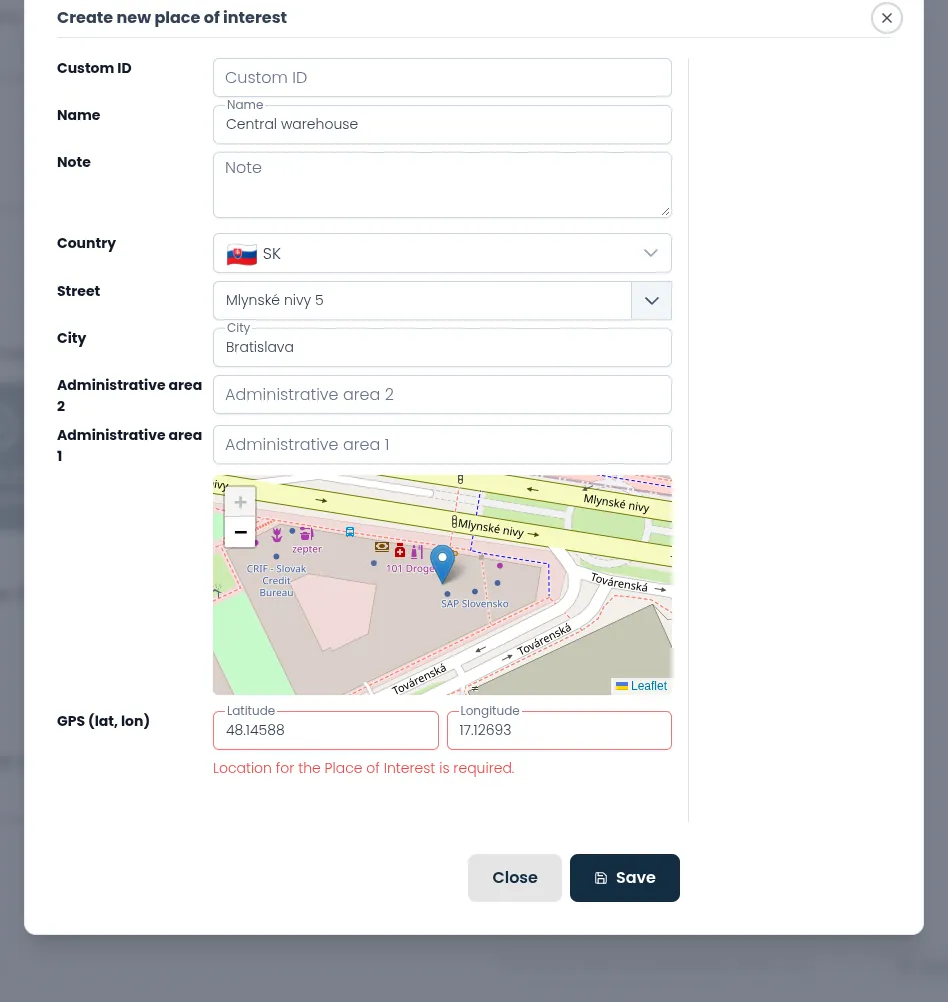
- Click Create new place of interest.
- Optional: fill in Custom ID, such as a depot number. Leave it empty and Venzeo generates one.
- Fill in Name.
- Optional: fill in Note, for example access details. Reporters see it in the mobile app.
- Choose the Country.
- Start typing in Street and pick a suggestion. Venzeo fills in City, both administrative areas and the GPS position.
- Click the map or type the coordinates into GPS (lat, lon). A GPS position is required.
- Click Save. Venzeo shows Successfully added and lists the new place of interest.
Edit a place of interest
- Open the main menu, expand Place Of Interest (POI) and choose Manage POIs.
- Click Edit next to the place of interest.
- Change the fields and click Save. Venzeo shows Successfully saved.
Deactivate a place of interest
A deactivated place of interest is hidden in the mobile app. Existing reports keep it, and you can still filter by it.
- Open the main menu, expand Place Of Interest (POI) and choose Manage POIs.
- Click Edit next to the place of interest.
- In the pop-up, click Deactivate and confirm with Yes. Venzeo shows Successfully deactivated.
To bring a place of interest back, turn on Show inactive Places of Interest, click Reactivate next to it and confirm with Yes.
Places of interest in reports
In the mobile app, reporters attach one place of interest per report: they search for it, or scan a QR code or NFC tag with its custom ID. To see reports grouped by place, open the main menu and choose Places of Interest view under Reports.